Radio Connections
Instructions for connecting radios, repeaters and AllStarLink interfaces including USB Radio Interfaces, RTCM, GPS, URI/URI X and like devices.
If you have information to share regarding a connection, please provide that information via a GitHub request at https://github.com/AllStarLink/ASL3-Manual/issues.
PC or Raspberry PI Interfaces
The most common solution for connecting an ASL node to a radio is through use of USB Audio Interfaces/Radio Adapters that make use of the CMXXX series USB audio chips. The difficulty can range from advanced to beginner, usually depending on the completeness and cost of the solution.
Masters Communications RA-Series Radio Adapters
Based on the CM119A series sound chips. These are inexpensive but feature rich USB Radio Adapters for AllStarLink Link. These can be used in either PCs or Raspberry Pis
Link to all adapters - https://masterscommunications.com/products/radio-adapter/ra-index.html
Masters Communications DRA-Series Radio Adapters
These can also be used for analog. '''If your radio has a 6-pin interface (Yaesu, Kenwood), these are plug & play, with no soldering required.'''
Link to all adapters - https://masterscommunications.com/products/radio-adapter/dra/dra-index.html
HotSpotRadios
The Allstarlink Node HotSpotRadio arrives ready to plug in and use. The HotSpotRadio comes with your Allstarlink node number, frequency and CTCSS pre-confuigured and ready to go! No need to set audio levels or configure your node, its already done for you and arrives plug n play!
SHARI / Kits4HHams
The Kits4Hams SHARI is a popular interface for the Pi that comes in both USB and Pi Hat versions.
ClearNode
ClearNode is a Raspberry Pi based AllStar, Echolink and DMR node with an integrated low power UHF or VHF radio transceiver. It is an all-in-one "hotspot" solution for those looking to use the AllStarLink network locally. This is a plug-and-play solution that requires almost no technical knowledge of AllStar.
https://www.node-ventures.com/
Techno By George
DMK URI
The URI is manufactured and sold by DMK Engineering.
https://dmkeng.myshopify.com/collections/frontpage
DIY Modified CM108/CM119 USB Fobs
You can purchase an unmodified CMXXX USB sound card and solder GPIO directly for COS, PTT, and CTCSS. However, it's not for the faint of heart. Doing this requires a steady hand and magnification equipment to solder to the tiny leads on the circuit board.
Interface Cables
RTCM/VOTER
See the [/voter] page for the primary entry point to the detailed information about the RTCM/VOTER interfaces. They are primarily used to build a voting repeater system (optionally with simulcast). Also note there is model specific radio information below on this page that also discusses connecting to the RTCM/VOTER.
Comments on Specific Radios
Motorola
CDM
CDMs make great nodes. This eBay reseller has very nice cables. Use to connect to URI or RTCM.
CDM Cable from Kurt Meltzer KC4NX - Cable 83 has only one output to use for either COS or CTCSS. Use another cable if you need both COS and CTCSS.
Maxtrac / Radius / GM300
The venerable Maxtrac is a radio that was very well built, apparently has very stable reference LO, and can take a beating. When aligned properly, and sufficient vectored cooling is made, this radio will last for a very long, time even under several hours with of transmitting per day.
These older radios are fairly common and easily to come by due to the narrow banding. Probably the hardest part is finding a computer and the RSS to program them. The Maxtrac family has many different configurations, from low band VHF, to 800 Mhz. But the easiest variant of the are the ones with the 16 pin connector. See the Repeater Builder Maxtrac Page. Connections are fairly simple but can be hard to determine which is the correct one to use. This http://www.repeater-builder.com/motorola/maxtrac/maxtrac-option-plug.html is a good place to start.
The radio will need to be aligned, and programmed to the frequenc(y/ies) you want to use. You will also need to program the Accessory Option for PL/DPL & CSQ Output.
-
Most URIs can accept active high or active low for valid RX signal detection, ie, open squelch. It is HIGHLY recommend in any situation COS is set to USB or active high. This will prevent issues. Too many to mention.
-
It is a good idea to program pin 8 on the Maxtrac/GM300 for PL/DPL & CSQ output, active high. This will cause the radio to emit a 5Vdc signal when the squelch is open, and go low when squelch is closed.
With the radio facing you in normal operating positing, volume knob on top left, and mic connection right below it, turn the radio over from the right side. The accessory connector is located on the rear, right top of the radio at this point. Starting from left to right, the pins on the top are / and the pins on the bottom are /. If you want to hear audio from the radios speaker, just a header jumper on the far right pins 15 and 16.
MTR-2000
Quantar
The Quantar can be tricky to interface as it's extremely programmable and you will need a wireline card for I/O connections. By default the I/O will not work unless the "wildcard" table is programmed. This wildcard table is Boolean logic of interrupt states in the radio, is extremely flexible and frustrating to debug. It's a base station in it's own class.
- Quantar/RTCM Interface Cable - Note you will want to use DSP/BEW Firmware on the RTCM if using the RTCM do squelch.
- Another Quantar/RTCM Interface Cable
- Astro-TAC/RTCM Interface Cable
-
Interfacing to a Quantar with P25NX - Interfacing the Quantar using simple USB into AllStarLink and P25NX linking at the same time. This is driven by programming on the Quantar Wildcard tables.
- Quantar MRTI/URI Cable
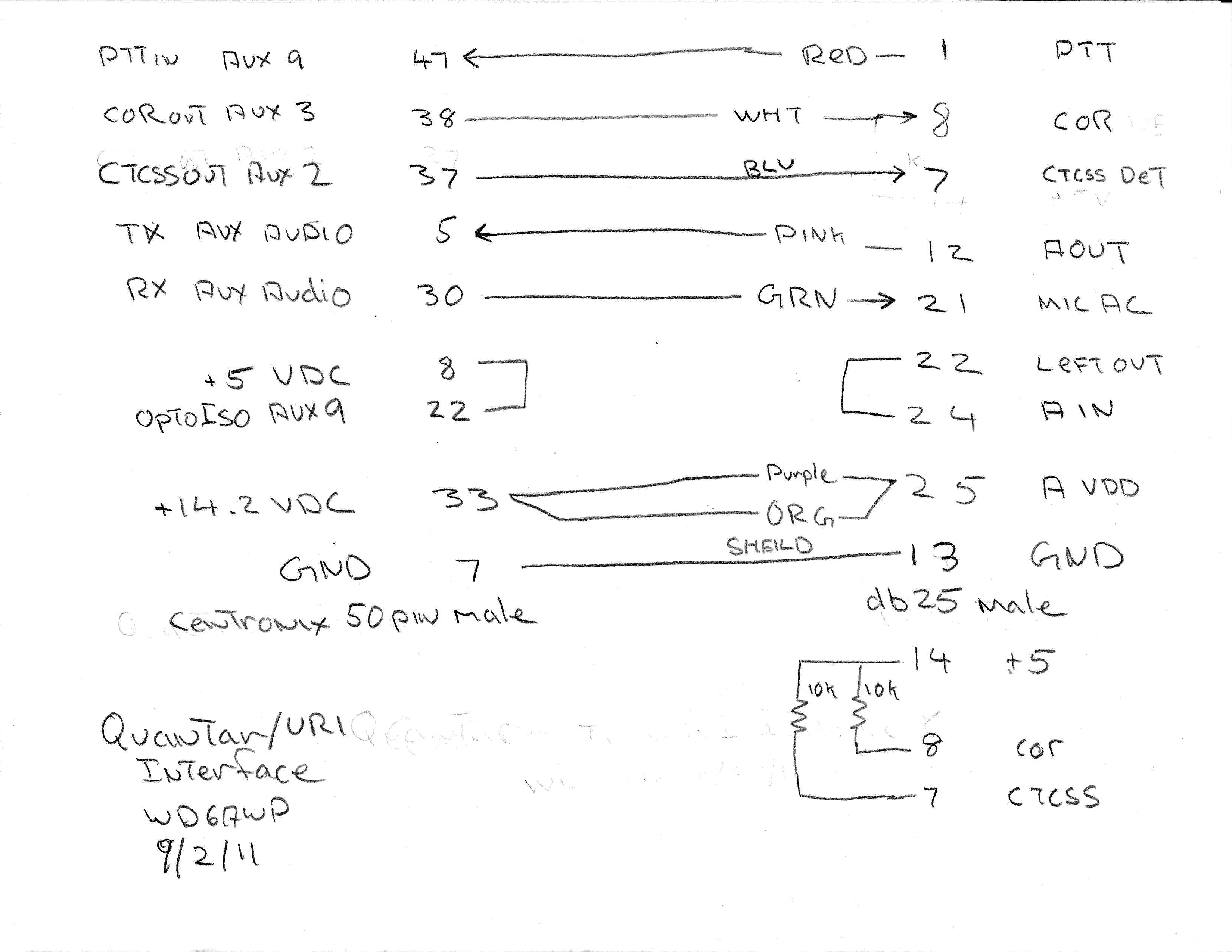
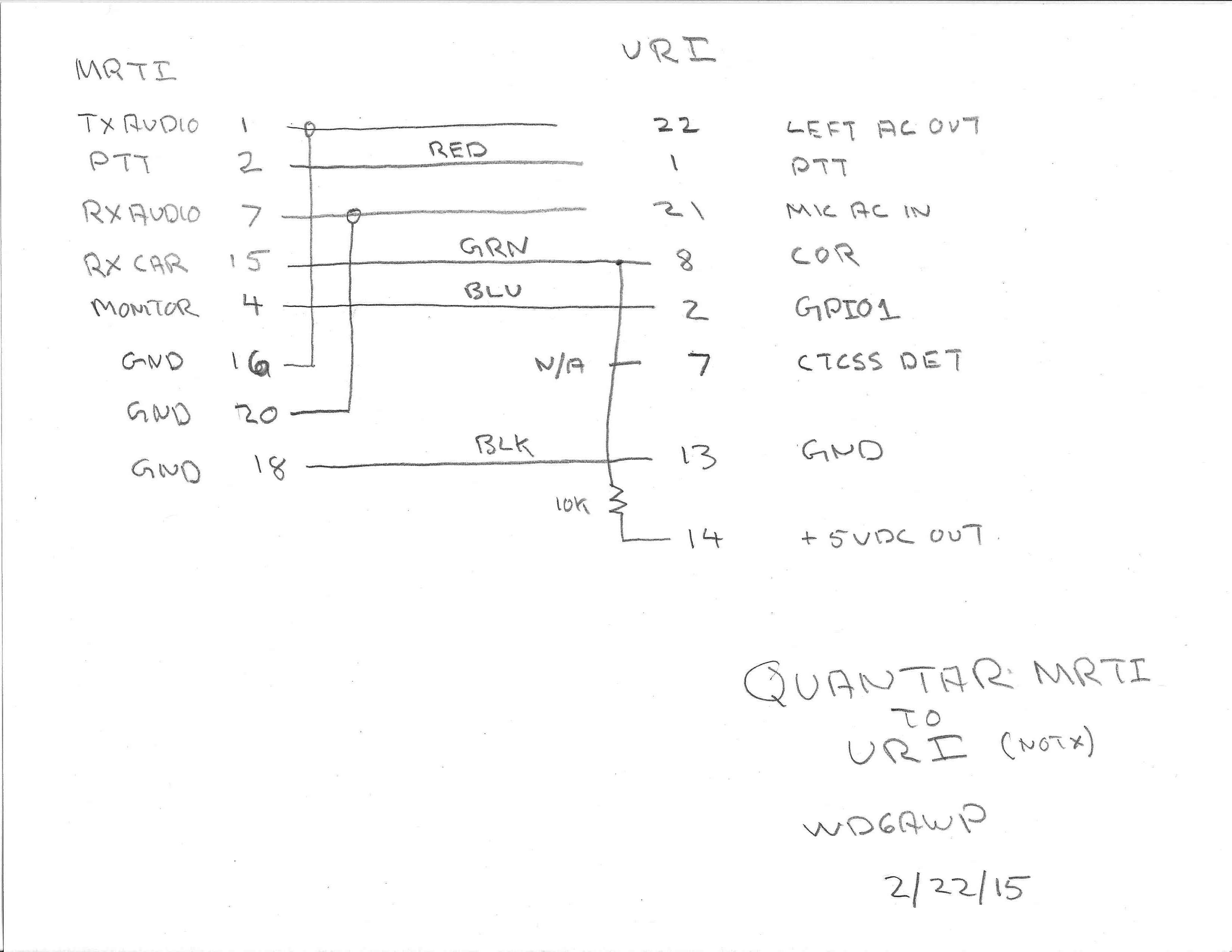
Also see the dedicated Quantar Voter page for detailed information.
Syntor X
The Motorola Syntor X with an Xcat installed makes a great frequency agile remote base. For more information see WD6AWP Syntor Xcat.
Kenwood
TKR 750/850
Connections to: PTT, COS, RX audio out and MIC audio in
TX/RX board, MIC audio input, pins 4 & 5: floating ground, must not tie to any other ground! Some installations may require a 10dB, resistor L-network consisting of a 4.7k and 470 ohm resistors. The 470 ohm resistor connection across pins four and five, the 4.7k resistor is soldered to pin 5 to which your TX audio from the URI will connect to.
The MIC audio gain, deviation, and balance adjustments are very sensitive!
RA-35 without TX adj. trimmer pots: Using a service monitor with deviation metering, start low and work your way up to 3KHz deviation with 1KHz tone, generated by simpleusb-tune-menu. If enabled, *904 turns this tone on and off by command, ie, no tone time-out as in simpleusb-tune-menu.
TKR750/850
See http://www.masterscommunications.com/products/radio-adapter/txt/tkr.txt for using the Masters Communications RA-35 or RA-40 radio adapters with the TKR750/850.
Yaesu
FT 7900/8900
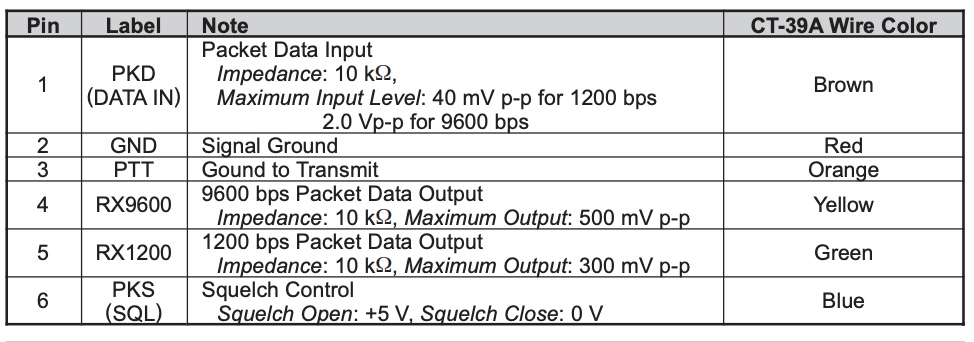
Both models sport a mini-DIN 6 pin connector on the rear panel. These can easily be hooked into a URI of your choice, such as a DRA-50 and an appropriate cable. This is a nearly plug & play solution for this radio.
Yaesu 7900/8900 Data Port Diagram
Baofeng
Baofeng 888
Baofeng UV82
Repeater Controller
RTCMs
An example of using RTCMs to replace 420 links
Spectra Engineering
- MX800 Base station - Complete setup guide for the MX800 Base station which includes fallback to the built in controller and an audio delay module.