Known Issues & Compatibility Problems
The following issues are currently known to exist in ASL3 and, where possible, what the workarounds are.
Known Issues
Known issues are problems that are not solvable in the short term by the AllStarLink team or may not be solvable at all.
ASL Nodes on Mobile Hotspots
Carrier Grade NAT (CGNAT) is Not Supported
AllStarLink Nodes operating from mobile hotspots, or other similar networks, are not supported if the carrier employs Carrier Grade NAT (CGNAT) and your IAX traffic does not have a consistent public IP address for egress onto the Internet.
AllStarLink connections require matching of IP addresses coming from a node with the central directory of nodes. When CGNAT is deployed, it's quite common that the registration servers receive the connection from a different public IP address than a server receiving an incoming connection from that same node.
Common carriers with this problem at T-Mobile, AT&T, and Verizon. The use of a mobile hotspot or "Home Internet" service that relies on the 5G cellular network in the US are included. Fixed-line service such as AT&T or Verizon fiber optic service may operate differently. Outside of the US, this includes carriers such as Virgin, Optus, Bell Canada, Deutsche Telecom, and Vodafone.
Users behind CGNAT can try the following for potential workarounds:
- Switch to IAX-based Registration
- Use 44Net Connect VPN
- Use a custom VPN or tunneling setup
The problem is not otherwise solvable. Please do not post to the ASL Community, open a ticket with the Helpdesk, or file a bug in GitHub for this issue. Specific questions about custom tunnels or advanced VPN configuration may be asked under the "third-party apps" topic.
Future improvements to ASL changing the node-authentication process will address this issue and is on the long-term engineering roadmap along with IPv6 support.
resize2fs_once "Error"
There are intermittent cases of errors on the screen or in the system logs about a failure of a service named resize2fs_once.service after the final first boot upon installation. The error may report that it "Failed to start" or "timed out". If the / partition has been properly resized, which has been the case in every known
occurrence of the error, then there is no action to take and the issue will not appear on subsequent reboots.
A properly resized / should be a bit smaller than the full size of the SD card or USB drive used with the device.
In Cockpit, look at the Storage tab:
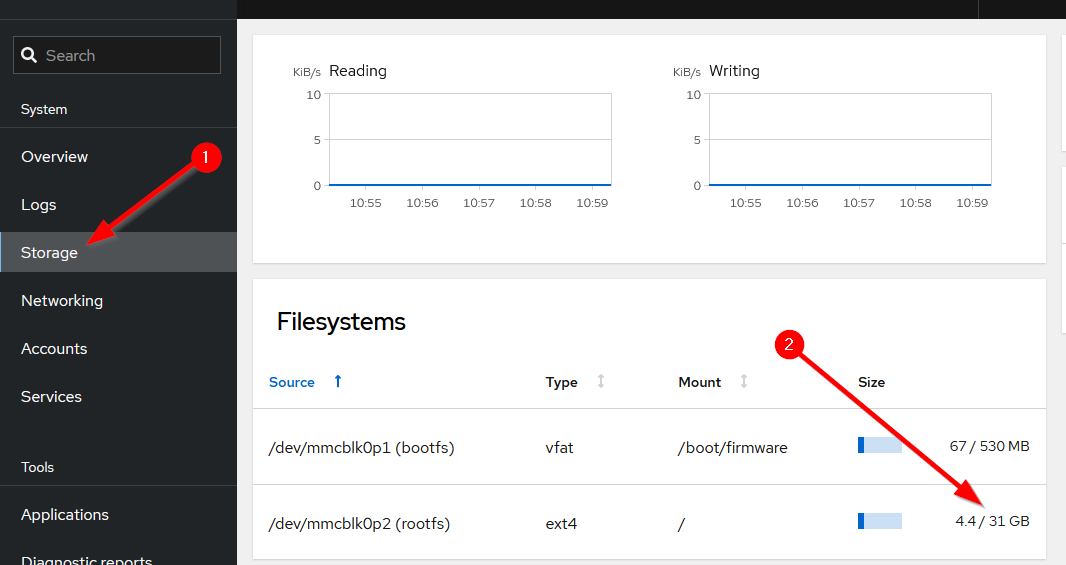
In this example, / is a 31G partition on a 32G SD card.
Incompatibilities and Changes From Legacy Versions
With the upgrade to Asterisk 20 and beyond, and all the associated code changes that had to go along with it, ASL3 has certain incompatible with older versions of the AllStarLink system. There are also some changes in how certain things function.
VOTER/RTCM Default Port
Modern installations of Asterisk runs as the unprivileged asterisk user rather than as root. Linux typically prohibits non-root users from listening on a TCP
port below 1024. The default port for VOTERs/RTCMs was previously port 667. This has been changed to port 1667 to allow Asterisk to access the port, and connect to VOTERs/RTCMs.
If the VOTER/RTCM port cannot be easily changed, make sure you are using the Debian packaging provided by AllStarLink which uses systemd to start asterisk with permissions to listen on 667.
If running the AllStarLink Pi Appliance (or another system with a firewall), inbound to port 667/UDP must be permitted. For directions on how to do this with the Pi Appliance see Managing the Firewall. Don't forget to also allow this port through any firewall that may part of your internet connection.
Pi Serial Port(s) Available by Default
On the ASL3 Pi Appliance, the system comes pre-configured for /dev/serial0 (formerly /dev/ttyAMA0) accessibility.
That means that Bluetooth and the default serial console are disabled. Any directions requiring editing of config.txt or cmdline.txt are unnecessary with the ASL3 appliance.
Pi /dev Entry Changes
As ASL3 is based on Debian 12 and 13, users with Raspberry Pi devices must note that the serial port on the Pi expansion header is now /dev/serial0 rather than the historical /dev/ttyAMA0. If you are following directions for Pi serial port operations, such as programming an SA818/DRA818-based radio hat or a SHARI node, use /dev/serial0 in place of the /dev/ttyAMA0 reference.
USB udev
A udev rule is needed to allow Asterisk running as non-root access to the USB system. ASL3 systems installed from .debs using apt install, or Raspberry Pi images will already have this rule in place, so no additional action is required. This is documented for advanced users and developers.
/etc/udev/rules.d/90-asl3.rules
SUBSYSTEM=="usb", ATTRS{idVendor}=="0d8c", GROUP="plugdev", TAG+="uaccess"
The udev subsystem must be reloaded and then the USB device re-inserted into the port. udev is reloaded with the command:
udevadm control --reload
Alternatively, reboot the system.
SimpleUSB and USBRadio Config Files
The way USB audio interfaces are handled, including their config files has changed. See the USB Audio Interfaces page in this section for detailed information.